Wednesday, 14 January 2015

A New Year's resolution for start-ups, PRs and journalists writing about museums

Some technology in a museum
Dear journalists, start-ups, agencies and PR folk,

I get that you want to talk about how amazing some new app, product or company is, but can you please do so without resorting to lazy, outdated cliches?

I've seen far too many articles make un-evidenced claims like 'museums don't realise people have different preferences in their galleries' or that museums are 'repeatedly turning a blind eye to technology, rather than recognizing it could be used to deliver an experience unique to every visitor'. If your app, product or company is good enough, you shouldn't need to do the 'competition' down to stand out, and besides, sometimes my eyes hurt from rolling so hard.

I know that traditionally everyone makes New Years resolutions for themselves, but in the spirit of disruption (ha! not really) I'd like to suggest a New Years resolution for you:  leave those cliches about dusty old museums behind and find out what people in your city love about their museums. Find a new angle for your piece, one that recognises that museums don't always get it right but that they've probably been thinking about the best uses of technology for their audiences longer than you have.

Museums have been experimenting with new technologies for decades. The post-2008 financial cuts might have reduced the number of digital pilot projects across the sector as a whole but most museums are still investing in improving the visitor experience, engaging wider audiences and making a difference in the lives of their communities. You probably don't need to lecture them on what they could be doing - they already know, and wish they had more resources to do cool things.

You could even check out past papers and discussions at conferences and groups like the Museum Computer Network (MCN), Museums and the Web, the Museums Computer Group (MCG), MuseumNext, the Visitor Studies Group (VSG), the many fantastic museum technology, design and audience research blogs, the #musetech hashtag (when agencies aren't spamming it) and much, much more if you wanted some inspiration or to learn what's been tried in the past and how it worked out...

Yours in museums,

Mia

Thursday, 11 December 2014

The rise of interpolated content?

One thing that might stand out when we look back at 2014 is the rise of interpolated content. We've become used to translating around auto-correct errors in texts and emails but we seem to be at a tipping point where software is going ahead and rewriting content rather than prompting you to notice and edit things yourself.

iOS doesn't just highlight or fix typos, it changes the words you've typed. To take one example, iOS users might use 'ill' more than they use 'ilk', but if I typed 'ilk' I'm not happy when it's replaced by an algorithmically-determined 'ill'. As a side note, understanding the effect of auto-correct on written messages will be a challenge for future historians (much as it is for us sometimes now).

And it's not only text. In 2014, Adobe previewed GapStop, 'a new video technology that eases transitions and removes pauses from video automatically'. It's not just editing out pauses, it's creating filler images from existing images to bridge the gaps so the image doesn't jump between cuts. It makes it a lot harder to tell when someone's words have been edited to say something different to what they actually said - again, editing audio and video isn't new, but making it so easy to remove the artefacts that previously provided clues to the edits is.

Photoshop has long let you edit the contrast and tone in images, but now their Content-Aware Move, Fill and Patch tools can seamlessly add, move or remove content from images, making it easy to create 'new' historical moments. The images on extrapolated-art.com, which uses '[n]ew techniques in machine learning and image processing [...] to extrapolate the scene of a painting to see what the full scenery might have looked like' show the same techniques applied to classic paintings.

But photos have been manipulable since they were first used, so what's new? As one Google user reported in It’s Official: AIs are now re-writing history, 'Google’s algorithms took the two similar photos and created a moment in history that never existed, one where my wife and I smiled our best (or what the algorithm determined was our best) at the exact same microsecond, in a restaurant in Normandy.' The important difference here is that he did not create this new image himself: Google did, without asking or specifically notifying him. In twenty years time, this fake image may become part of his 'memory' of the day. Automatically generated content like this also takes the question of intent entirely out of the process of determining 'real' from interpolated content. And if software starts retrospectively 'correcting' images, what does that mean for our personal digital archives, for collecting institutions and for future historians?

Interventions between the act of taking a photo and posting it on social media might be one of the trends of 2015. Facebook are about to start 'auto-enhancing' your photos, and apparently, Facebook Wants To Stop You From Uploading Drunk Pictures Of Yourself. Apparently this is to save your mum and boss seeing them; the alternative path of building a social network that don't show everything you do to your mum and boss was lost long ago. Would the world be a better place if Facebook or Twitter had a 'this looks like an ill-formed rant, are you sure you want to post it?' function?

So 2014 seems to have brought the removal of human agency from the process of enhancing, and even creating, text and images. Where do we go from here? How will we deal with the increase of interpolated content when looking back at this time? I'd love to hear your thoughts.

Thursday, 4 December 2014

Three ways you can help with 'In their own words: collecting experiences of the First World War' (and a CENDARI project update)

Somehow it's a month since I posted about my CENDARI research project (in Moving forward: modelling and indexing WWI battalions) on this site. That probably reflects the rhythm of the project - less trying to work out what I want to do and more getting on with doing it. A draft post I started last month simply said, 'A lot of battalions were involved in World War One'. I'll do a retrospective post soon, and here's a quick summary of on-going work.

First, a quick recap. My project has two goals - one, to collect a personal narrative for each battalion in the Allied armies of the First World War; two, to create a service that would allow someone to ask 'where was a specific battalion at a specific time?'. Together, they help address a common situation for people new to WWI history who might ask something like 'I know my great-uncle was in the 27th Australian battalion in March 1916, where would he have been and what would he have experienced?'.

I've been working on streamlining and simplifying the public-facing task of collecting a personal narrative for each battalion, and have written a blog post, Help collect soldiers’ experiences of WWI in their own words, that reduces it to three steps:
  1. Take one of the diaries, letters and memoirs listed on the Collaborative Collections wiki, and
  2. Match its author with a specific regiment or battalion.
  3. Send in the results via this form.
If you know of a local history society, family historian or anyone else who might be interested in helping, please send them along to this post: Help collect soldiers’ experiences of WWI in their own words.

Work on specifying the relevant data structures to support a look-up service to answer questions about a specific units location and activities at a specific time largely moved to the wiki:
You can see the infobox structures in progress by flipping from the talk to the Template tabs. You'll need to request an account to join in but more views, sample data and edge cases would be really welcome.

Populating the list of battalions and other units has been a huge task in itself, partly because very few cultural institutions have definitive lists of units they can (or want to) share, but it's necessary to support both core goals. I've been fortunate to have help (see 'Thanks and recent contributions' on 'How you can help') but the task is on-going so get in touch if you can help!

So there are three different ways you can help with 'In their own words: collecting experiences of the First World War':


Finally, last week I was in New Zealand to give a keynote on this work at the National Digital Forum. The video for 'Collaborative collections through a participatory commons' is online, so you can catch up on the background for my project if you've got 40 minutes or so to spare. Should you be in Dublin, I'm giving a talk on 'A pilot with public participation in historical research: linking lived experiences of the First World War' at the Trinity Long Room Hub today (thus the poster).

And if you've made it this far, perhaps you'd like to apply for a CENDARI Visiting Research Fellowships 2015 yourself?

Friday, 7 November 2014

All the things I didn't say in my welcome to UKMW14 'Museums beyond the web'...

Here are all the things I (probably) didn't say in my Chair's welcome for the Museums Computer Group annual conference... Other notes, images and tweets from the day are linked from 'UKMW14 round-up: posts, tweets, slides and images'.

Welcome to MCG's UKMW14: Museums beyond the web! We've got great speakers lined up, and we've built in lots of time to catch up and get to know your peers, so we hope you'll enjoy the day.

It's ten years since the MCG's Museums on the Web became an annual event, and it's 13 years since it was first run in 2001. It feels like a lot has changed since then, but, while the future is very definitely here, it's also definitely not evenly distributed across the museum sector. It's also an interesting moment for the conference, as 'the web' has broadened to include 'digital', which in turn spans giant distribution networks and tiny wearable devices. 'The web' has become a slightly out-dated shorthand term for 'audience-facing technologies'.

When looking back over the last ten years of programmes, I found myself thinking about planetary orbits. Small planets closest to the sun whizz around quickly, while the big gas giants move incredibly slowly. If technology start-ups are like Mercury, completing a year in just 88 Earth days, and our audiences are firmly on Earth time, museum time might be a bit closer to Mars, taking two Earth years for each Mars year, or sometimes even Jupiter, completing a circuit once every twelve years or so.

But museums aren't planets, so I can only push that metaphor so far. Different sections of a museum move at different speeds. While heroic front of house staff can observe changes in audience behaviours on a daily basis and social media platforms can be adopted overnight, websites might be redesigned every few years, but galleries are only updated every few decades (if you're lucky). For a long time it felt like museums were using digital platforms to broadcast at audiences without really addressing the challenges of dialogue or collaborating with external experts.

But at this point, it seems that, finally, working on digital platforms like the web has pushed museums to change how they work. On a personal level, the need for specific technical skills hasn't changed, but more content, education and design jobs work across platforms, are consciously 'multi-channel' and audience rather than platform-centred in their focus. Web teams seem to be settling into public engagement, education, marketing etc departments as the idea of a 'digital' department slowly becomes an oxymoron. Frameworks from software development are slowly permeating organisations that use to think in terms of print runs and physical gallery construction. Short rounds of agile development are replacing the 'build and abandon after launch' model, voices from a range of departments are replacing the disembodied expert voice, and catalogues are becoming publications that change over time.

While many of us here are comfortable with these webby methods, how will we manage the need to act as translators between digital and museums while understanding the impact of new technologies? And how can we help those who are struggling to keep up, particularly with the impact of the cuts?

Today is a chance to think about the technologies that will shape the museums of the future. What will audiences want from us? Where will they go looking for information and expertise, and how much of that information and expertise should be provided by museums? How can museums best provide access to their collections and knowledge over the next five, ten years?

We're grateful to our sponsors, particularly as their support helps keep ticket prices affordable. Firstly I'd like to thank our venue sponsors, the Natural History Museum. Secondly, I'd like to thank Faversham & Moss for their sponsorship of this conference. Go chat to them and find out more about their work!

Friday, 31 October 2014

Moving forward: modelling and indexing WWI battalions

A super-quick update from my CENDARI Fellowship this week. I set up the wiki for In their own words: linking lived experiences of the First World War a week ago but only got stuck into populating it with lists of various national battalions this week. My current task list, copied from the front page is to:
If you can help with any of that, let me know! Or just get stuck in and edit the site.

I've started another Google Doc with very sketchy Notes towards modelling information about World War One Battalions. I need to test it with more battalion histories and update it iteratively. At this stage my thinking is to turn it into an InfoBox format to create structured data via the wiki. It's all very lo-fi and much less designed than my usual projects, but I'm hoping people will be able to help regardless.

So, in this phase of the project, the aim is find a personal narrative - a diary, letters, memoirs or images - for each military unit in the British Army. Can you help? 

Monday, 27 October 2014

Looking for (crowdsourcing) love in all the right places

One of the most important exercises in the crowdsourcing workshops I run is the 'speed dating' session. The idea is to spend some time looking at a bunch of crowdsourcing projects until you find a project you love. Finding a project you enjoy gives you a deeper insight into why other people participate in crowdsourcing, and will see you through the work required to get a crowdsourcing project going. I think making a personal connection like this helps reduce some of the cynicism I occasionally encounter about why people would volunteer their time to help cultural heritage collections. Trying lots of projects also gives you a much better sense of the types of barriers projects can accidentally put in the way of participation. It's also a good reminder that everyone is a nerd about something, and that there's a community of passion for every topic you can think of.

If you want to learn more about designing history or cultural heritage crowdsourcing projects, trying out lots of project is a great place to start. The more time you can spend on this the better - an hour is ideal - but trying just one or two projects is better than nothing. In a workshop I get people to note how a project made them feel - what they liked most and least about a project, and who they'd recommend it to. You can also note the input and output types to help build your mental database of relevant crowdsourcing projects.

The list of projects I suggest varies according to the background of workshop participants, and I'll often throw in suggestions tailored to specific interests, but here's a generic list to get you started.

10 Most Wanted http://10most.org.uk/ Research object histories
Ancient Lives http://ancientlives.org/ Humanities, language, text transcription
British Library Georeferencer http://www.bl.uk/maps/ Locating and georeferencing maps (warning: if it's running, only hard maps may be left!)
Children of the Lodz Ghetto http://online.ushmm.org/lodzchildren/ Citizen history, research
Describe Me http://describeme.museumvictoria.com.au/ Describe objects
Family History Transcription Project http://www.flickr.com/photos/statelibrarync/collections/ Document transcription (Flickr/Yahoo login required to comment)
Herbaria@home http://herbariaunited.org/atHome/ (for bonus points, compare it with Notes from Nature https://www.zooniverse.org/project/notes_from_nature) Transcribing specimen sheets (or biographical research)
HistoryPin Year of the Bay 'Mysteries' https://www.historypin.org/attach/project/22-yearofthebay/mysteries/index/ Help find dates, locations, titles for historic photographs; overlay images on StreetView
Micropasts http://crowdsourced.micropasts.org/app/photomasking/newtask Photo-masking to help produce 3D objects; also structured transcription
Museum Metadata Games: Dora http://museumgam.es/dora/ Tagging game with cultural heritage objects (my prototype from 2010)
NYPL Building Inspector http://buildinginspector.nypl.org/ A range of tasks, including checking building footprints, entering addresses
Papers of the War Department http://wardepartmentpapers.org/ Document transcription
Planet Hunters http://planethunters.org/ Citizen science; review visualised data
Powerhouse Museum Collection Search http://www.powerhousemuseum.com/collection/database/menu.php Tagging objects
Reading Experience Database http://www.open.ac.uk/Arts/RED/ Text selection, transcription, description.
Smithsonian Digital Volunteers: Transcription Center https://transcription.si.edu/ Text transcription
Tiltfactor Metadata Games http://www.metadatagames.org/ Games with cultural heritage images
Transcribe Bentham http://www.transcribe-bentham.da.ulcc.ac.uk/ History; text transcription
Trove http://trove.nla.gov.au/newspaper?q= Correct OCR errors, transcribe text, tag or describe documents
US National Archives http://www.amara.org/en/teams/national-archives/ Transcribing videos
What's the Score at the Bodleian http://www.whats-the-score.org/ Music and text transcription, description
What's on the menu http://menus.nypl.org/ Structured transcription of restaurant menus
What's on the menu? Geotagger http://menusgeo.herokuapp.com/ Geolocating historic restaurant menus
Wikisource - random item link http://en.wikisource.org/wiki/Special:Random/Index Transcribing texts
Worm Watch http://www.wormwatchlab.org Citizen science; video
Your Paintings Tagger http://tagger.thepcf.org.uk/ Paintings; free-text or structured tagging

NB: crowdsourcing is a dynamic field, some sites may be temporarily out of content or have otherwise settled in transit. Some sites require registration, so you may need to find another site to explore while you're waiting for your registration email.

Friday, 17 October 2014

In which I am awed by the generosity of others, and have some worthy goals

A quick update from my CENDARI fellowship working on a project that's becoming 'In their own words: linking lived experiences of the First World War'. I've spent the week reading (again a mixture of original diaries and letters, technical stuff like ontology documentation and also WWI history forums and 'amateur' sites) and writing. I put together a document outlining a rang of possible goals and some very sketchy tech specs, and opened it up for feedback. The goals I set out are copied below for those who don't want to delve into detail. The commentable document, 'Linking lived experiences of the First World War': possible goals and a bunch of technical questions goes into more detail.

However, the main point of this post is to publicly thank those who've helped by commenting and sharing on the doc, on twitter or via email. Hopefully I'm not forgetting anyone, as I've been blown away by and am incredibly grateful for the generosity of those who've taken the time to at least skim 1600 words (!). It's all helped me clarify my ideas and find solutions I'm able to start implementing next week. In no order at all - at CENDARI, Jennifer Edmond, Alex O'Connor, David Stuart, Benjamin Å tular, Francesca Morselli, Deirdre Byrne; online Andrew Gray @generalising; Alex Stinson @ DHKState; jason webber @jasonmarkwebber; Alastair Dunning @alastairdunning; Ben Brumfield @benwbrum; Christine Pittsley; Owen Stephens @ostephens; David Haskiya @DavidHaskiya; Jeremy Ottevanger @jottevanger; Monika Lechner @lemondesign; Gavin Robinson ‏@merozcursed; Tom Pert @trompet2 - thank you all!

Worthy goals (i.e. things I'm hoping to accomplish, with the help of historians and the public; only some of which I'll manage in the time)

At the end of this project, someone who wants to research a soldier in WWI but doesn't know a thing about how armies were structured should be able to find a personal narrative from a soldier in the same bit of the army, to help them understand experiences of the Great War.

Hopefully these personal accounts will provide some context, in their own words, for the lived experiences of WWI. Some goals listed are behind-the-scenes stuff that should just invisibly make personal diaries, letters and memoirs more easily discoverable. It needs datasets that provide structures that support relationships between people and documents; participatory interfaces for creating or enhancing information about contemporary materials (which feed into those supporting structures), and interfaces that use the data created.
More specifically, my goals include:
  • A personal account by someone in each unit linked to that unit's record, so that anyone researching a WWI name would have at least one account to read. To populate this dataset, personal accounts (diaries, letters, etc) would need to be linked to specific soldiers, who can then be linked to specific units. Linking published accounts such as official unit histories would be a bonus. [Semantic MediaWiki]
  • Researched links between individual men and the units they served in, to allow their personal accounts to be linked to the relevant military unit. I'm hoping I can find historians willing to help with the process of finding and confirming the military unit the writer was in. [Semantic MediaWiki]
  • A platform for crowdsourcing the transcription and annotation of digitised documents. The catch is that the documents for transcription would be held remotely on a range of large and small sites, from Europeana's collection to library sites that contain just one or two digitised diaries. Documents could be tagged/annotated with the names of people, places, events, or concepts represented in them. [Semantic MediaWiki??]
  • A structured dataset populated with the military hierarchy (probably based on The British order of battle of 1914-1918) that records the start and end dates of each parent-child relationship (an example of how much units moved within the hierarchy)
  • A published webpage for each unit, to hold those links to official and personal documents about that unit in WWI. In future this page could include maps, timelines and other visualisations tailored to the attributes of a unit, possibly including theatres of war, events, campaigns, battles, number of privates and officers, etc. (Possibly related to CENDARI Work Package 9?) [Semantic MediaWiki]
  • A better understanding of what people want to know at different stages of researching WWI histories. This might include formal data gathering, possibly a combination of interviews, forum discussions or survey 

Goals that are more likely to drop off, or become quick experiments to see how far you can get with accessible tools:

  • Trained 'named entity recognition' and 'natural language processing' tools that could be run over transcribed text to suggest possible people, places, events, concepts, etc [this might drop off the list as the CENDARI project is working on a tool called Pineapple (PDF poster). That said, I'll probably still experiment with the Stanford NER tool to see what the results are like] 
  • A way of presenting possible matches from the text tools above for verification or correction by researchers. Ideally, this would be tied in with the ability to annotate documents 
  • The ability to search across different repositories for a particular soldier, to help with the above.


Friday, 10 October 2014

Linking lived experiences of WWI through battalions?

Another update from my CENDARI Fellowship at Trinity College Dublin, looking at 'In their own words: linking lived experiences of the First World War', which is a small-scale, short-term pilot based on WWI collections. My first post is Defining the scope: week one as a CENDARI Fellow. Over the past two weeks I've done a lot of reading - more WWI diaries and letters; WWI histories and historiography; specialist information like military structures (orders of battle, etc). I've also sketched out lots of snippets of possible functions, data, relationships and other outcomes.

I've narrowed the key goal (or minimum viable product, if you prefer) of my project to linking personal accounts of the war - letters, diaries, memoirs, photographs, etc - to battalions, by creating links from the individual who wrote them to their military unit. Once these personal accounts are linked to particular military units, they can be linked to higher units - from the battalion, ship or regiment to brigade, corps, etc - and to particular places, activities, events and campaigns. The idea behind this is to provide context for an individual's experience of WWI by linking to narratives written by people in the same situation. I'm still working out how to organise the research process of matching the right soldier to the right battalion/regiment/ship so that relevant personal stories are discoverable. I'm also still working out which attributes of a battalion are relevant, how granular the data will be, and how to design for the inevitable variation in data quality (for example, the availability of records for different armies varies hugely). Finally, I’m still working out which bits need computer science tools and which need the help of other historians.

Given the number of centenary projects, I was hoping to find more structured data about WWI entities. Trenches to Triples would be useful source of permanent URLs, and terms to train named entity recognition, but am I missing other sources?

There's a lot of content, and so much activity around WWI records, but it's spread out across the internet. Individual people and small organisations are digitising and transcribing diaries and letters. Big collecting projects like Europeana have lots of personal accounts, but they're often not transcribed and they don't seem to be linked to structured data about the item itself. Some people have painstakingly transcribed unit diaries, but they're not linked from the official site, so others wouldn't know there's a more easily read version of the diary available. I've been wondering if you could crowdsource the process of transcribing records held elsewhere, and offer the transcripts back to sites. Using dedicated transcription software would let others suggest corrections, and might also make it possible to link sections of the text to external 'entities' like names, places, events and concepts.

Albert Henry Bailey. Image:
Sir George Grey Special Collections,
Auckland Libraries, AWNS-19150909-39-5
To help figure out the issues researchers face and the variations in available resources, I'm researching randomly selected soldiers from different Allied forces. I've posted my notes on Private Albert Henry Bailey, service number 13/970a. You'll see that they're in prose form, and don't contain any structured data. Most of my research used digitised-but-not-transcribed images of documents, with some transcribed accounts. It would definitely benefit from deeper knowledge of military history - for a start, which battalions were in the same place as his unit at the same time?

This account of the arrival and first weeks of the Auckland Mount Rifles at Gallipoli from the official unit history gives a sense of the density and specificity of local place names, as does the official unit diary, and I assume many personal accounts. I'm not sure how named entity recognition tools will cope, and ideally I'd like to find lists of places to 'train' the tools (including possibly some from the 'Trenches to Triples' project).

If there aren't already any structured data sources for military hierarchies in WWI, do I have to make one? And if so, how? The idea would be to turn prose descriptions like this Australian War Memorial history of the 27th AIF Battalion, this order of battle of the 2nd Australian Division and any other suitable sources into structured data. I can see some ways it might be possible to crowdsource the task, but it's a big task. But it's worth it - providing a service that lets people look up which higher military units, places. activities and campaigns a particular battalion/regiment/ship was linked to at a given time would be a good legacy for my research.

I'm sure I'm forgetting lots of things, and my list of questions is longer than my list of answers, but I should end here. To close, I want to share a quote from the official history of the Auckland Mounted Rifles. The author said he 'would like to speak of the splendid men of the rank and file who died during this three months' struggle. Many names rush to the memory, but it is not possible to mention some without doing an injustice to the memory of others'. I guess my project is driven by a vision of doing justice to the memory of every soldier, particularly those ordinary men who aren't as easily found in the records. I'm hoping that drawing on the work of other historians and re-linking disparate sources will help provide as much context as possible for their experiences of the First World War.

--
Update, 15 October 2014: if you've made it this far, you might also be interested in chipping in at 'Linking lived experiences of the First World War': possible goals and a bunch of technical questions.

Tuesday, 30 September 2014

It's here! Crowdsourcing our Cultural Heritage is now available

My edited volume, Crowdsourcing our Cultural Heritage, is now available! My introduction (Crowdsourcing our cultural heritage: Introduction), which provides an overview of the field and outlines the contribution of the 12 chapters, is online at Ashgate's site, along with the table of contents and index. There's a 10% discount if you order online.

If you're in London on the evening of Thursday 20th November, we're celebrating with a book launch party at the UCL Centre for Digital Humanities. Register at http://crowdsourcingculturalheritage.eventbrite.co.uk.

Here's the back page blurb: "Crowdsourcing, or asking the general public to help contribute to shared goals, is increasingly popular in memory institutions as a tool for digitising or computing vast amounts of data. This book brings together for the first time the collected wisdom of international leaders in the theory and practice of crowdsourcing in cultural heritage. It features eight accessible case studies of groundbreaking projects from leading cultural heritage and academic institutions, and four thought-provoking essays that reflect on the wider implications of this engagement for participants and on the institutions themselves.
Crowdsourcing in cultural heritage is more than a framework for creating content: as a form of mutually beneficial engagement with the collections and research of museums, libraries, archives and academia, it benefits both audiences and institutions. However, successful crowdsourcing projects reflect a commitment to developing effective interface and technical designs. This book will help practitioners who wish to create their own crowdsourcing projects understand how other institutions devised the right combination of source material and the tasks for their ‘crowd’. The authors provide theoretically informed, actionable insights on crowdsourcing in cultural heritage, outlining the context in which their projects were created, the challenges and opportunities that informed decisions during implementation, and reflecting on the results.

This book will be essential reading for information and cultural management professionals, students and researchers in universities, corporate, public or academic libraries, museums and archives."

Massive thanks to the following authors of chapters for their intellectual generosity and their patience with up to five rounds of edits, plus proofing, indexing and more...

  1. Crowdsourcing in Brooklyn, Shelley Bernstein; 
  2. Old Weather: approaching collections from a different angle, Lucinda Blaser; 
  3. ‘Many hands make light work. Many hands together make merry work’: Transcribe Bentham and crowdsourcing manuscript collections, Tim Causer and Melissa Terras; 
  4. Build, analyse and generalise: community transcription of the Papers of the War Department and the development of Scripto, Sharon M. Leon; 
  5. What's on the menu?: crowdsourcing at the New York Public Library, Michael Lascarides and Ben Vershbow; 
  6. What’s Welsh for ‘crowdsourcing’? Citizen science and community engagement at the National Library of Wales, Lyn Lewis Dafis, Lorna M. Hughes and Rhian James; 
  7. Waisda?: making videos findable through crowdsourced annotations, Johan Oomen, Riste Gligorov and Michiel Hildebrand; 
  8. Your Paintings Tagger: crowdsourcing descriptive metadata for a national virtual collection, Kathryn Eccles and Andrew Greg.
  9. Crowdsourcing: Crowding out the archivist? Locating crowdsourcing within the broader landscape of participatory archives, Alexandra Eveleigh; 
  10.  How the crowd can surprise us: humanities crowdsourcing and the creation of knowledge, Stuart Dunn and Mark Hedges; 
  11. The role of open authority in a collaborative web, Lori Byrd Phillips; 
  12. Making crowdsourcing compatible with the missions and values of cultural heritage organisations, Trevor Owens. 

Friday, 26 September 2014

Defining the scope: week one as a CENDARI Fellow

I'm coming to the end of my first week as a Transnational Access Fellow with the CENDARI project at the Trinity College Dublin Long Room Hub. CENDARI 'aims to leverage innovative technologies to provide historians with the tools by which to contextualise, customise and share their research', which dovetails with my PhD research incredibly well. This Fellowship gives me an opportunity to extend my ideas about 'Enriching cultural heritage collections through a Participatory Commons' without trying to squish them into a history thesis, and is probably perfectly timed in giving me a break from writing up.

View over Trinity College Dublin
There are two parts to my CENDARI project 'Bridging collections with a participatory Commons: a pilot with World War One archives'. The first involves working on the technical, data and cultural context/requirements for the 'participatory history commons' as an infrastructure; the second is a demonstrator based on that infrastructure. I'll be working out how official records and 'shoebox archives' can be mined and indexed to help provide what I'm calling 'computationally-generated context' for people researching lives touched by World War One.

This week I've read metadata schema (MODS extended with TEI and a local schema, if you're interested) and ontology guidelines, attended some lively seminars on Irish history, gotten my head around CENDARI's work packages and the structure of the British army during WWI. I've started a list of nearby local history societies with active research projects to see if I can find some working on WWI history - I'd love to work with people who have sources they want to digitise and generally do more with, and people who are actively doing research on First World War lives. I've started to read sample primary materials and collect machine-readable sources so I can test out approaches by manually marking-up and linking different repositories of records. I'm going to spend the rest of the day tidying up my list of outcomes and deliverables and sketching out how all the different aspects of my project fit together. And tonight I'm going to check out some of the events at Discover Research Dublin. Nerd joy!

'The cooperative archive'?

Finally, I've dealt with something I'd put off for ages. 'Commons' is one of those tricky words that's less resonant than it could be, so I looked for a better name than the 'participatory history commons'. because 'commons' is one of those tricky words that's less resonant than it could be. I doodled around words like collation, congeries, cluster, demos, assemblage, sources, commons, active, engaged, participatory, opus, archive, digital, posse, mob, cahoots and phrases like collaborative collections, collaborative history, history cooperative, but eventually settled on 'cooperative archive'. This appeals because 'cooperative' encompasses attitudes or values around working together for a common purpose, and it includes those who share records and those who actively work to enhance and contextualise them. 'Archive' suggests primary sources, and can be applied to informal collections of 'shoebox archives' and the official holdings of museums, libraries and archives.

What do you think - does 'cooperative archive' work for you? Does your first reaction to the name evoke anything like my thoughts above?

Update, October 11: following some market testing on Facebook, it seems 'collaborative collections' best describes my vision.

Sunday, 21 September 2014

These are a few of my favourite (audience research) things

On Friday I popped into London to give a talk at the Art of Digital meetup at the Photographer's Gallery. It's a great series of events organised by Caroline Heron and Jo Healy, so go along sometime if you can. I talked about different ways of doing audience research. (And when I wrote the line 'getting to know you' it gave me an earworm and a 'lessons from musicals' theme). It was a talk of two halves. In the first, I outlined different ways of thinking about audience research, then went into a little more detail about a few of my favourite (audience research) things.

There are lots of different ways to understand the contexts and needs different audiences bring to your offerings. You probably also want to test to see if what you're making works for them and to get a sense of what they're currently doing with your websites, apps or venues. It can help to think of research methods along scales of time, distance, numbers, 'density' and intimacy. (Or you could think of it as a journey from 'somewhere out there' to 'dancing cheek to cheek'...)

'Time' refers to both how much time a method asks from the audience and how much time it takes to analyse the results. There's no getting around the fact that nearly all methods require time to plan, prepare and pilot, sorry! You can run 5 second tests that ask remote visitors a single question, or spend months embedded in a workplace shadowing people (and more time afterwards analysing the results). On the distance scale, you can work with remote testers located anywhere across the world, ask people visiting your museum to look at a few prototype screens, or physically locate yourself in someone's office for an interview or observation.

Numbers and 'density' (or the richness of communication and the resulting data) tend to be inversely linked. Analytics or log files let you gather data from millions of website or app users, one-question surveys can garner thousands of responses, you can interview dozens of people or test prototypes with 5-8 users each time. However, the conversations you'll have in a semi-structured interview are much richer than the responses you'll get to a multiple-choice questionnaire. This is partly because it's a two-way dialogue, and partly because in-person interviews convey more information, including tone of voice, physical gestures, impressions of a location and possibly even physical artefacts or demonstrations. Generally, methods that can reach millions of remote people produce lots of point data, while more intimate methods that involve spending lots of time with just a few people produce small datasets of really rich data.

So here are few of my favourite things: analytics, one-question surveys, 5 second tests, lightweight usability tests, semi-structured interviews, and on-site observations. Ultimately, the methods you use are a balance of time and distance, the richness of the data required, and whether you want to understand the requirements for, or measure the performance of a site or tool.

Analytics are great for understanding how people found you, what they're doing on your site, and how this changes over time. Analytics can help you work out which bits of a website need tweaking, and for measuring to see the impact of changes. But that only gets you so far - how do you know which trends are meaningful and which are just noise? To understand why people are doing what they do, you need other forms of research to flesh them out. 

One question surveys are a great way of finding out why people are on your site, and whether they've succeeded in achieving their goals for being there. We linked survey answers to analytics for the last Let's Get Real project so we could see how people who were there for different reasons behaved on the site, but you don't need to go that far - any information about why people are on your site is better than none! 

5 second tests and lightweight usability tests are both ways to find out how well a design works for its intended audiences. 5 second tests show people an interface for 5 seconds, then ask them what they remember about it, or where they'd click to do a particular task. They're a good way to make sure your text and design are clear. Usability tests take from a few minutes to an hour, and are usually done in person. One of my favourite lightweight tests involves grabbing a sketch, an iPad or laptop and asking people in a café or other space if they'd help by testing a site for a few minutes. You can gather lots of feedback really quickly, and report back with a prioritised list of fixes by the end of the day. 

Semi-structured interviews use the same set of questions each time to ensure some consistency between interviews, but they're flexible enough to let you delve into detail and follow any interesting diversions that arise during the conversation. Interviews and observations can be even more informative if they're done in the space where the activities you're interested in take place. 'Contextual inquiry' goes a step further by including observations of the tasks you're interested in being performed. If you can 'apprentice' yourself to someone, it's a great way to have them explain to you why things are done the way they are. However, it's obviously a lot more difficult to find someone willing and able to let you observe them in this way, it's not appropriate for every task or research question, and the data that results can be so rich and dense with information that it takes a long time to review and analyse. 

And one final titbit of wisdom from a musical - always look on the bright side of life! Any knowledge is better than none, so if you manage to get any audience research or usability testing done then you're already better off than you were before.

[Update: a comment on twitter reminded me of another favourite research thing: if you don't yet have a site/app/campaign/whatever, test a competitor's!]

Wednesday, 10 September 2014

Does citizen science invite sabotage?

Q: Does citizen science invite sabotage?

A: No.

Ok, you may want a longer version. There's a paper on crowdsourcing competitions that has lost some important context in doing the rounds of media outlets. For example, on Australia's ABC, 'Citizen science invites sabotage':
'a study published in the Journal of the Royal Society Interface is urging caution at this time of unprecedented reliance on citizen science. It's found crowdsourced research is vulnerable to sabotage. [...] MANUEL CEBRIAN: Money doesn't really matter, what matters is that you can actually get something - whether that's recognition, whether that's getting a contract, whether that's actually positioning an idea, for instance in the pro and anti-climate change debate - whenever you can actually get ahead.'.
The fact that the research is studying crowdsourcing competitions, which are fundamentally different to other forms of crowdsourcing that do not have a 'winner takes all' dynamic, is not mentioned. It also does not mention the years of practical and theoretical work on task validation which makes it quite difficult for someone to get enough data past various controls to significantly alter the results of crowdsourced or citizen science projects.

You can read the full paper for free, but even the title, Crowdsourcing contest dilemma, and the abstract makes the very specific scope of their study clear:
Crowdsourcing offers unprecedented potential for solving tasks efficiently by tapping into the skills of large groups of people. A salient feature of crowdsourcing—its openness of entry—makes it vulnerable to malicious behaviour. Such behaviour took place in a number of recent popular crowdsourcing competitions. We provide game-theoretic analysis of a fundamental trade-off between the potential for increased productivity and the possibility of being set back by malicious behaviour. Our results show that in crowdsourcing competitions malicious behaviour is the norm, not the anomaly—a result contrary to the conventional wisdom in the area. Counterintuitively, making the attacks more costly does not deter them but leads to a less desirable outcome. These findings have cautionary implications for the design of crowdsourcing competitions.
And from the paper itself:

'We study a non-cooperative situation where two players (or firms) compete to obtain a better solution to a given task. [...] The salient feature is that there is only one winner in the competition. [...] In scenarios of ‘competitive’ crowdsourcing, where there is an inherent desire to hurt the opponent, attacks on crowdsourcing strategies are essentially unavoidable.'
From Crowdsourcing contest dilemma by Victor Naroditskiy, Nicholas R. Jennings, Pascal Van Hentenryck and Manuel Cebrian. Published 20 August 2014 doi: 10.1098/​rsif.2014.0532 J. R. Soc. Interface 6 October 2014 vol. 11 no. 99 20140532
I don't know about you, but 'an inherent desire to hurt the opponent' doesn't sound like the kinds of cooperative crowdsourcing projects we tend to see in citizen science or cultural heritage crowdsourcing.   The study is interesting, but it is not generalisable to 'crowdsourcing' as a whole.

If you're interested in crowdsourcing competitions, you may also be interested in: On the trickiness of crowdsourcing competitions: some lessons from Sydney Design from May 2013. 

Tuesday, 9 September 2014

Helping us fly? Machine learning and crowdsourcing

Moon Machine by Bernard Brussel-Smith via Serendip-o-matic
Over the past few years we've seen an increasing number of projects that take the phrase 'human-computer interaction' literally (or perhaps turning HCI into human-computer integration), organising tasks done by people and by computers into a unified system. One of the most obvious benefits of crowdsourcing on digital platforms has been the ability to coordinate the distribution and validation of tasks, but now data classified by people through crowdsourcing is being fed into computers to improve machine learning so that computers can learn to recognise images almost as well as we do. I've outlined a few projects putting this approach to work below. Of course, this creates new challenges for the future - what do cultural heritage crowdsourcing projects do when all the fun tasks like image tagging and text transcription can be done by computers? After all, Fast Company reports 'at least one Zooniverse project, Galaxy Zoo Supernova, has already automated itself out of existence'. More positively, assuming we can find compelling reasons for people to spend time with cultural heritage collections, how does machine learning and task coordination free us to fly further?

The Public Catalogue Foundation has taken tags created through Your Paintings Tagger and turned them over to computers. As they explain, the results are impressive. The art of computer image recognition: 'Using the 3.5 million or so tags provided by taggers, the research team at Oxford 'educated' image-recognition software to recognise the top tagged terms. Professor Zisserman explains this is a three stage process. Firstly, gather all paintings tagged by taggers with a particular subject (e.g. ‘horse’). Secondly, use feature extraction processes to build an ‘object model’ of a horse (a set of characteristics a painting might have that would indicate that a horse is present). Thirdly, run this algorithm over the Your Paintings database and rank paintings according to how closely they match this model.'

The BBC World Service archive ‘used an open-source speech recognition toolkit to listen to every programme and convert it to text’, extracted keywords or tags from the transcripts then got people to check the correctness of the data created: ‘As well as listening to programmes in the archive, users can view the automatic tags and vote on whether they’re correct or incorrect or add completely new tags. They can also edit programme titles and synopses, select appropriate images and name the voices heard’. From Algorithms and Crowd-Sourcing for Digital Archives by Tristan Ferne. See also What we learnt by crowdsourcing the World Service archive by Yves Raimond, Michael Smethurst, Tristan Ferne on 15 September 2014: 'we believe we have shown that a combination of automated tagging algorithms and crowdsourcing can be used to publish a large archive like this quickly and efficiently'.

And of course the Zooniverse is working on this. From their Milky Way project blog, New MWP paper outlines the powerful synergy between citizens scientists, professional scientists, and machine learning: '...a wonderful synergy that can exist between citizen scientists, professional scientists, and machine learning. The example outlined with the Milky Way Project is that citizens can identify patterns that machines cannot detect without training, machine learning algorithms can use citizen science projects as input training sets, creating amazing new opportunities to speed-up the pace of discovery. A hybrid model of machine learning combined with crowdsourced training data from citizen scientists can not only classify large quantities of data, but also address the weakness of each approach if deployed alone.'

The CUbRIK project combines 'machine, human and social computation for multimedia search'. You can try it out at their technical demonstrator, HistoGraph and try to 'collaboratively identify missing information' about historic photographs. [Added October 2014]

If you're interested in the theory, an early discussion of human input into machine learning is in Quinn and Bederson's 2011 Human Computation: A Survey and Taxonomy of a Growing Field. More recently, the SOCIAM: The Theory and Practice of Social Machines project is looking at 'a new kind of emergent, collective problem solving, in which we see (i) problems solved by very large scale human participation via the Web, (ii) access to, or the ability to generate, large amounts of relevant data using open data standards, (iii) confidence in the quality of the data and (iv) intuitive interfaces', including 'citizen science social machines'. If you're really keen, you can get a sense of the state of the field from various conference papers, including ICML ’13 Workshop: Machine Learning Meets Crowdsourcing and ICML ’14 Workshop: Crowdsourcing and Human Computing. There's also a mega-list of academic crowdsourcing conferences and workshops, though it doesn't include much on the tiny corner of the world that is crowdsourcing in cultural heritage.

NB: this post is a bit of a marker so I've somewhere to put thoughts on machine learning and human-computer integration as I finish my thesis; I'll update this post as I collect more references. Do you know of examples I've missed, or implications we should consider? Comment here or on twitter to start the conversation... 

Thursday, 7 August 2014

Who loves your stuff? How to collect links to your site

If you've ever wondered who's using content from your site or what people find interesting, here are some ways to find out, using the Design Museum's URL as an example.

'Links to your site' via Google Webmaster Tools https://support.google.com/webmasters/answer/55281

Reddit - plug your URL in after /domain/
http://www.reddit.com/domain/designmuseum.org

Wikipedia - plug your URL in after target=
http://en.wikipedia.org/w/index.php?title=Special%3ALinkSearch&target=*.designmuseum.org
Depending on your topic coverage you may want to look at other language Wikipedias.

Pinterest - plug your URL in after /source/
http://www.pinterest.com/source/designmuseum.org/

Twitter - search for the URL with quotes around it e.g. "designmuseum.org"

If you can see one particular page shooting up in your web stats, you could try a reverse image search on TinEye to see where it's being referenced.

What am I missing? I'd love to hear about similar links and methods for other sites - tell me in the comments or on twitter @mia_out.

Update: in a similar vein, Tim Sherratt  launched a new experiment called Trove Traces the same day, to 'explore how Trove newspapers are used' by listing pages that link to articles:

Update 2: Desi Gonzalez @ tried out some of these techniques and put together a great post on 'Thoughts on what museums can learn from Reddit, Yelp, and what @briandroitcour calls vernacular criticism'
You might also be interested in: Can you capture visitors with a steampunk arm?

Monday, 28 July 2014

The sounds of silence

I've been reading World War One diaries and letters (getting distracted by sources is an occupational hazard in my research) as I look for sample primary sources for teaching crowdsourcing at the HILT summer school in Maryland next week and for my CENDARI fellowship later this year.

I noticed one line in the Diary of William Henry Winter WWI 1915 that manages to convey a lot without directly giving any information about his opinions or relationship with this person:
'Major Saunders is supposed to be on his way back here as well but I don't know as he is coming back to our Coy, I hope not any way. We have got a good man now.'
There's nothing in the rest of the entries online that provides any further background. It may be that sections of this correspondence either didn't survive, weren't held by the same person, or perhaps were edited before deposit with the library or during transcription (it's particularly hard to judge as the site doesn't have images of the original document), so this particular silence may not have been intentional.

Whatever the case, it's a good reminder that there are silences behind every piece of content. While it's an amazing time to research the lives of those caught up in WWI as more and more private and public material is digitised and shared, silences can be created in many ways - official archives privilege some voices over others, personal collections can be censored or remain tucked away in a shoebox, and large parts of people's experiences simply went unrecorded. Content hidden behind paywalls or inaccessible to search engines (whether inadvertently hidden behind a search box or through lack of text transcription or description) is effectively hushed, if not exactly silenced. Sources and information about WWI collected via community groups on Facebook may be lost the next time they change their terms and conditions, or only partially shared. Our challenge is to make the gaps and questions about what was collected visible (audible?) while also being careful not to render the undigitised or unsearchable invisible in our rush to privilege the easily-accessible.

[Update: I've just realised that Winter might not have needed to provider further context as it seems many men in his unit were from the same region as him, and therefore his relationship with the Major may have pre-dated the war. Tacit knowledge is of course another example of the unrecorded, and one perhaps more familiar to us now than the unsayable.]

Thursday, 10 July 2014

How did 'play' shape the design and experience of creating Serendip-o-matic?

Here are my notes from the Digital Humanities 2014 paper on 'Play as Process and Product' I did with Brian Croxall, Scott Kleinman and Amy Papaelias based on the work of the 2013 One Week One Tool team.

Scott has blogged his notes about the first part of our talk, Brian's notes are posted as '“If hippos be the Dude of Love…”: Serendip-o-matic at Digital Humanities 2014' and you'll see Amy's work adding serendip-o-magic design to our slides throughout our three posts.

I'm Mia, I was dev/design team lead on Serendipomatic, and I'll be talking about how play shaped both what you see on the front end and the process of making it.

How did play shape the process?
The playful interface was a purposeful act of user advocacy - we pushed against the academic habit of telling, not showing, which you see in some form here. We wanted to entice people to try Serendipomatic as soon as they saw it, so the page text, graphic design, 1 - 2 - 3 step instructions you see at the top of the front page were all designed to illustrate the ethos of the product while showing you how to get started.


How can a project based around boring things like APIs and panic be playful? Technical decision-making is usually a long, painful process in which we juggle many complex criteria. But here we had to practice 'rapid trust' in people, in languages/frameworks, in APIs, and this turned out to be a very freeing experience compared to everyday work.
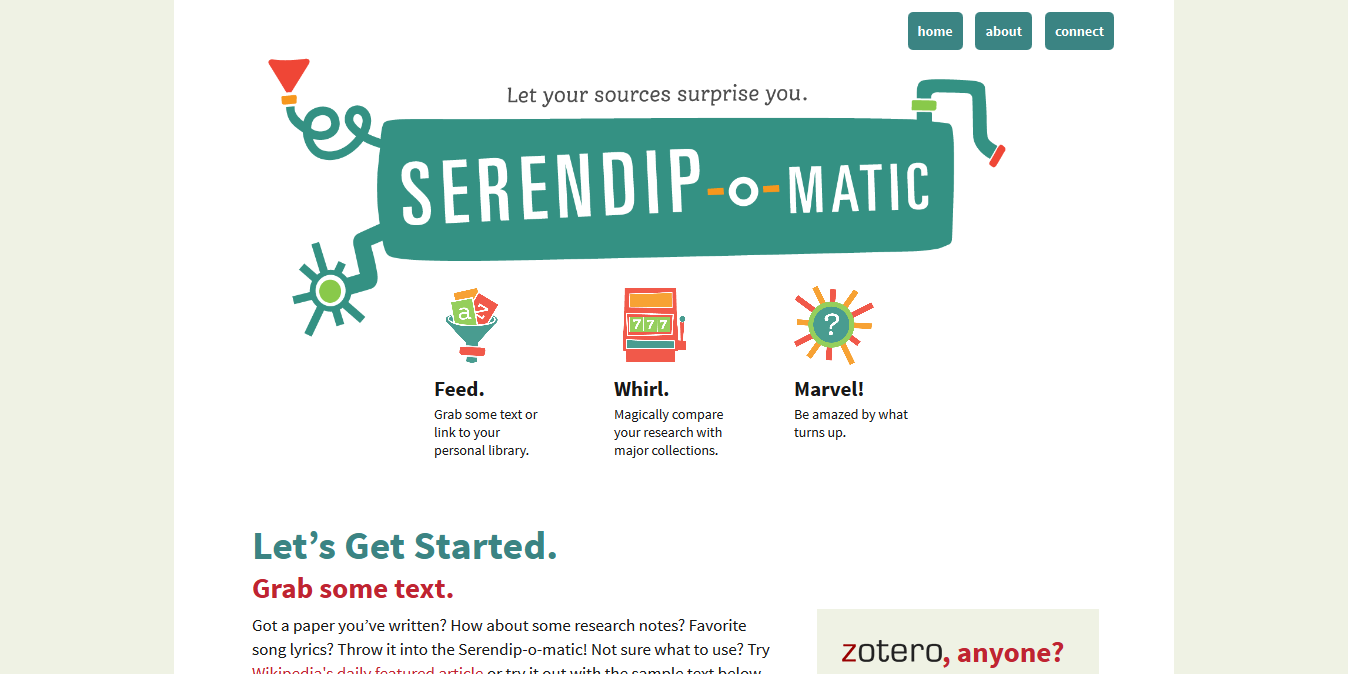
Serendip-o-matic_ Let Your Sources Surprise You.png
First, two definitions as background for our work...

Just in case anyone here isn't familiar with APIs, APIs are a set of computational functions that machines use to talk to each other. Like the bank in Monopoly, they usually have quite specific functions, like taking requests and giving out information (or taking or giving money) in response to those requests. We used APIs from major cultural heritage repositories - we gave them specific questions like 'what objects do you have related to these keywords?' and they gave us back lists of related objects.
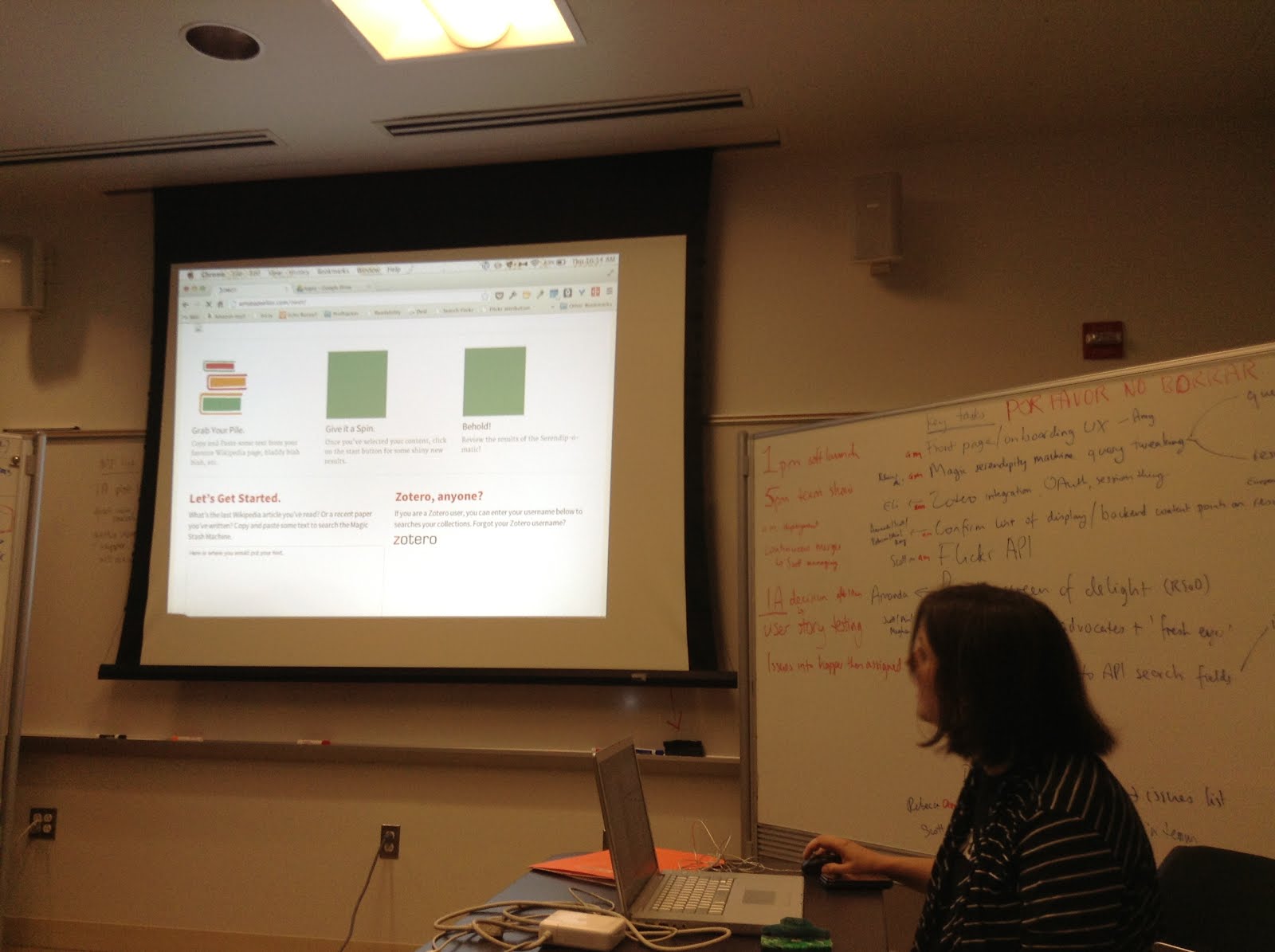
2013-08-01 10.14.45.jpg
The term 'UX' is another piece of jargon. It stands for 'user experience design', which is the combination of graphical, interface and interaction design aimed at making products both easy and enjoyable to use. Here you see the beginnings of the graphic design being applied (by team member Amy) to the underlying UX related to the 1-2-3 step explanation for Serendipomatic.

Feed.

serendipomatic_presentation p9.png
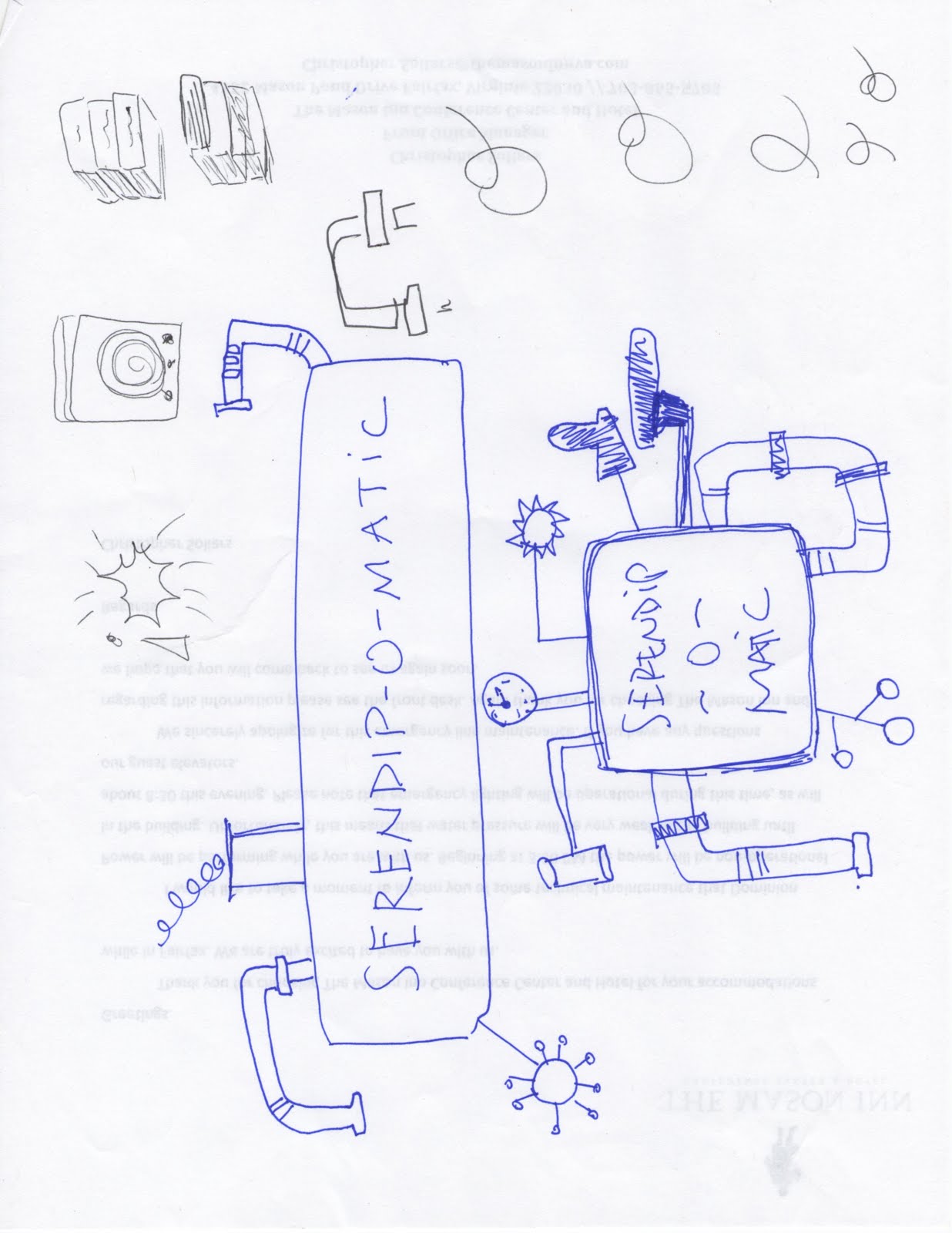
The 'feed' part of Serendipomatic parsed text given in the front page form into simple text 'tokens' and looked for recognisable entities like people, places or dates. There's nothing inherently playful in this except that we called the system that took in and transformed the text the 'magic moustache box', for reasons lost to time (and hysteria).

Whirl.
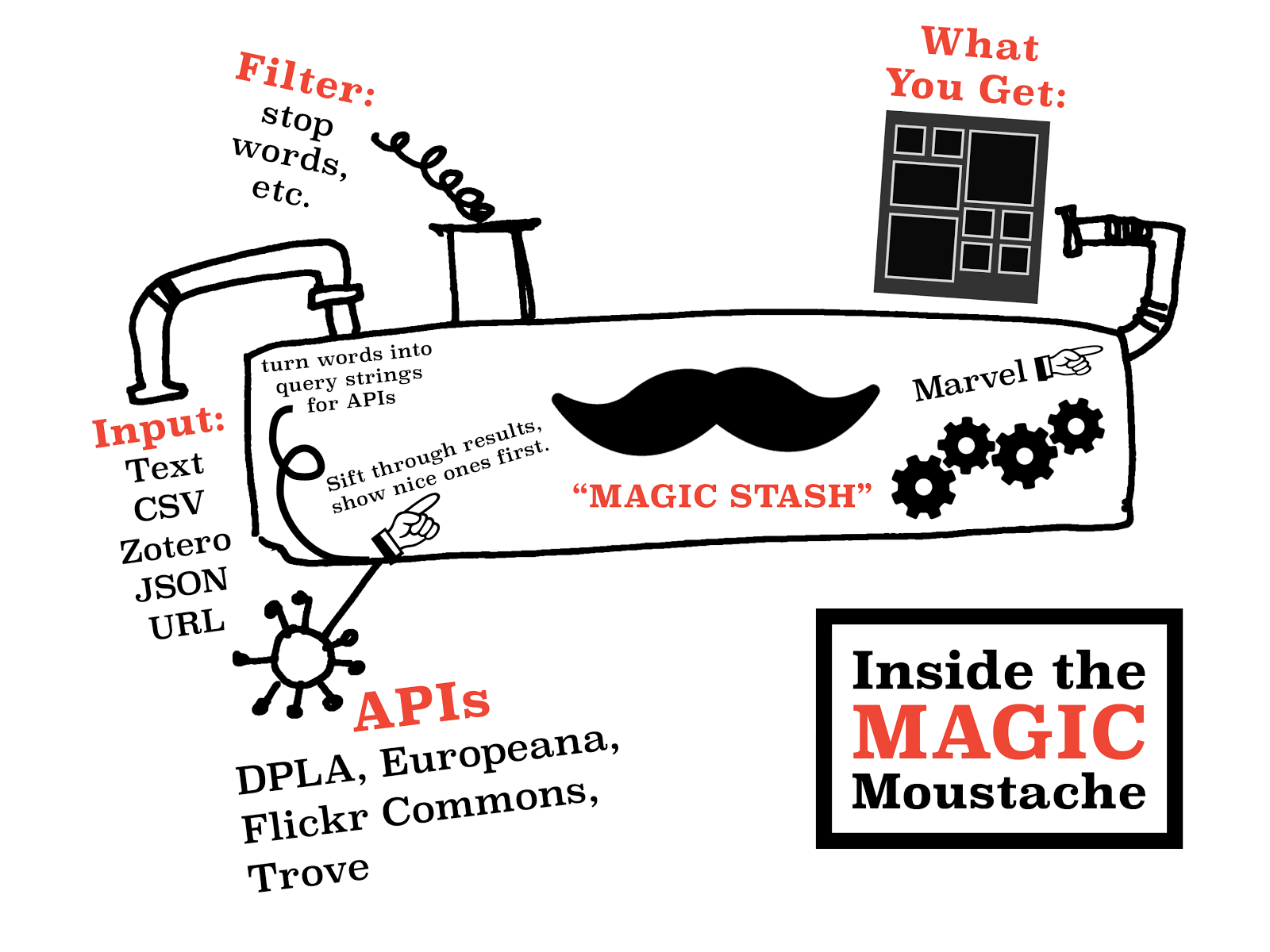
These terms were then mixed into database-style queries that we sent to different APIs. We focused on primary sources from museums, libraries, archives available through big cultural aggregators. Europeana and the Digital Public Library of America have similar APIs so we could get a long way quite quickly. We added Flickr Commons into the list because it has high-quality, interesting images and brought in more international content. [It also turns out this made it more useful for my own favourite use for Serendipomatic, finding slide or blog post images.] The results are then whirled up so there's a good mix of sources and types of results. This is the heart of the magic moustache.

Marvel.

User-focused design was key to making something complicated feel playful. Amy's designs and the Outreach team work was a huge part of it, but UX also encompasses micro-copy (all the tiny bits of text on the page), interactions (what happened when you did anything on the site), plus loading screens, error messages, user documentation.
We knew lots of people would be looking at whatever we made because of OWOT publicity; you don't get a second shot at this so it had to make sense at a glance to cut through social media noise. (This also meant testing it for mobiles and finding time to do accessibility testing - we wanted every single one of our users to have a chance to be playful.)


Without all this work on the graphic design - the look and feel that reflected the ethos of the product - the underlying playfulness would have been invisible. This user focus also meant removing internal references and in-jokes that could confuse people, so there are no references to the 'magic moustache machine'. Instead, 'Serendhippo' emerged as a character who guided the user through the site.

moustache.png But how does a magic moustache make a process playful?
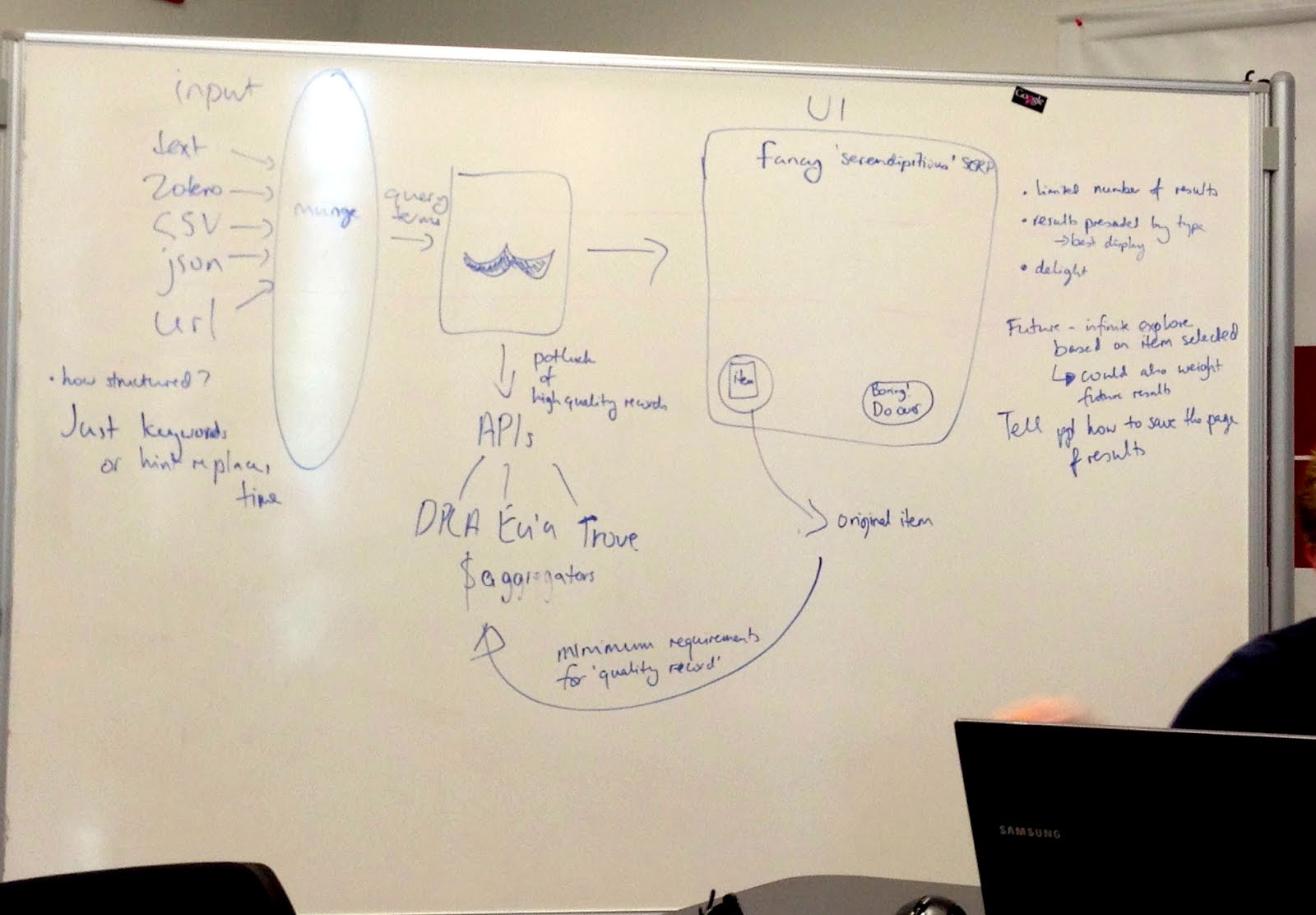
magicmoustachediagram.jpgThe moustache was a visible signifier of play. It appeared in the first technical architecture diagram - a refusal to take our situation too seriously was embedded at the heart of the project. This sketch also shows the value of having a shared physical or visual reference - outlining the core technical structure gave people a shared sense of how different aspects of their work would contribute to the whole. After all, if there aren't any structure or rules, it isn't a game.

This playfulness meant that writing code (in a new language, under pressure) could then be about making the machine more magic, not about ticking off functions on a specification document. The framing of the week as a challenge and as a learning experience allowed a lack of knowledge or the need to learn new skills to be a challenge, rather than a barrier. My role was to provide just enough structure to let the development team concentrate on the task at hand.

In a way, I performed the role of old-fashioned games master, defining the technical constraints and boundaries much as someone would police the rules of a game. Previous experience with cultural heritage APIs meant I was able to make decisions quickly rather than letting indecision or doubt become a barrier to progress. Just as games often reduce complex situations to smaller, simpler versions, reducing the complexity of problems created a game-like environment.

UX matters

Ultimately, a focus on the end user experience drove all the decisions about the backend functionality, the graphic design and micro-copy and how the site responded to the user.

It's easy to forget that every pixel, line of code or text is there either through positive decisions or decisions not consciously taken. User experience design processes usually involve lots of conversation, questions, analysis, more questions, but at OWOT we didn't have that time, so the trust we placed in each other to make good decisions and in the playful vision for Serendipomatic created space for us to focus on creating a good user experience. The whole team worked hard to make sure every aspect of the design helps people on the site understand our vision so they can get with exploring and enjoying Serendipomatic.

Some possible real-life lessons I didn't include in the paper

One Week One Tool was an artificial environment, but here are some thoughts on lessons that could be applied to other projects:
  • Conversations trump specifications and showing trumps telling; use any means you can to make sure you're all talking about the same thing. Find ways to create a shared vision for your project, whether on mood boards, technical diagrams, user stories, imaginary product boxes. 
  • Find ways to remind yourself of the real users your product will delight and let empathy for them guide your decisions. It doesn't matter how much you love your content or project, you're only doing right by it if other people encounter it in ways that make sense to them so they can love it too (there's a lot of UXy work on 'on-boarding' out there to help with this). User-centred design means understanding where users are coming from, not designing based on popular opinion.you can use tools like customer journey maps to understand the whole cycle of people finding their way to and using your site (I guess I did this and various other UXy methods without articulating them at the time). 
  • Document decisions and take screenshots as you go so that you've got a history of your project - some of this can be done by archiving task lists and user stories. 
  • Having someone who really understands the types of audiences, tools and materials you're working with helps - if you can't get that on your team, find others to ask for feedback - they may be able to save you lots of time and pain.
  • Design and UX resources really do make a difference, and it's even better if those skills are available throughout the agile development process.

Sunday, 15 June 2014

What are the hidden costs when you attend an event?

I think quite hard about how to make Museums Computer Groups events as inclusive as possible, from the diversity of the speakers on stage, to setting dates and times as early as possible to allow cheaper pre-booked travel, to keeping event costs down and more, but there's always more to learn.

I've been thinking about the 'shadow' or hidden costs accrued when people attend events. For me, it's the cost of getting to London (up to £50 if it's at short notice) and the time it takes (up to 3 hours each way if I'm unlucky). For others, accessibility requirements add to the cost of events, whether that's sign language translators, taxis to accessible train stations, or someone else's time as an aide. For parents or people with other caring responsibilities, childcare costs may add to the expense of attending an event. This in turn affects our ability to put together a broad range of speakers for an event. So -
I'm asking parents in the UK for a rough estimate of childcare costs for a day. You can share yours by tweeting @mia_out or share anonymously via this form if 140 characters won't allow you to mention things like your location, number and age of kids: What are the hidden costs when you attend an event?* The second question on the form is more general, so if your costs have nothing to do with parenting, go for it! I'll share the answers so that other event organisers have a sense of the costs too.

Here are some responses to get you started - with thanks to those who've already shared their costs:


We're a volunteer Committee rather than professional events organisers, and there's a humbling amount to learn from people out there. What hidden costs have I missed? Are there factors apart from cost that we should consider? We've got a Call for Papers for November 7's UKMW14: Museums Beyond the Web open at the moment (until June 30, 2014) - is there any language on that CfP or our Guidance for Speakers we should look at?

Update - more responses below.


I'd been thinking of single-day events and the impact on speaker availability, but I was reminded of the impact of childcare and other responsibilities for people wanting to attend residential programmes or longer events (or day events that require an overnight stay to fit the travel in). For example:
The ability to attend residential events for career or research fellowships is obviously going to have an impact on the types of people we see in leadership positions in later years, so thinking about things like childcare (which might be as simple as providing space for someone who already helps look after the family) now would make a positive difference later. On the positive side, many fellowships provide honorariums, which could help cover the hidden costs many of you have shared with me.

* I'm experimenting with typeform but already I'm concerned that their forms don't seem accessible - how are they for you?